Author: Thirdy

  • Very disappointing review: Press This! 2.0

    After trying the new “Press This!” 2.0 (embedded below)

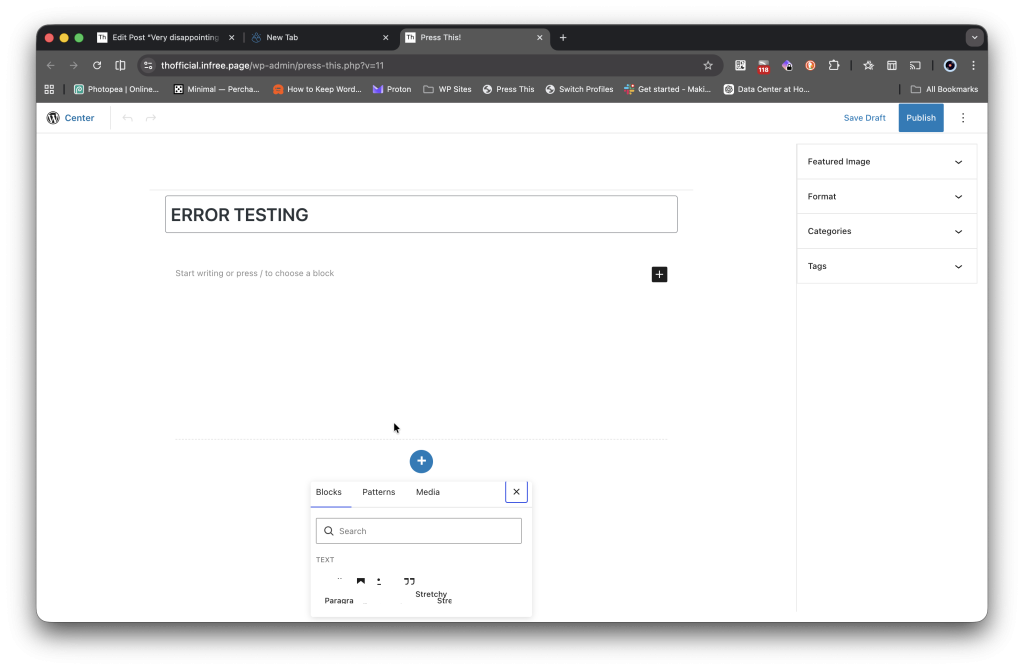
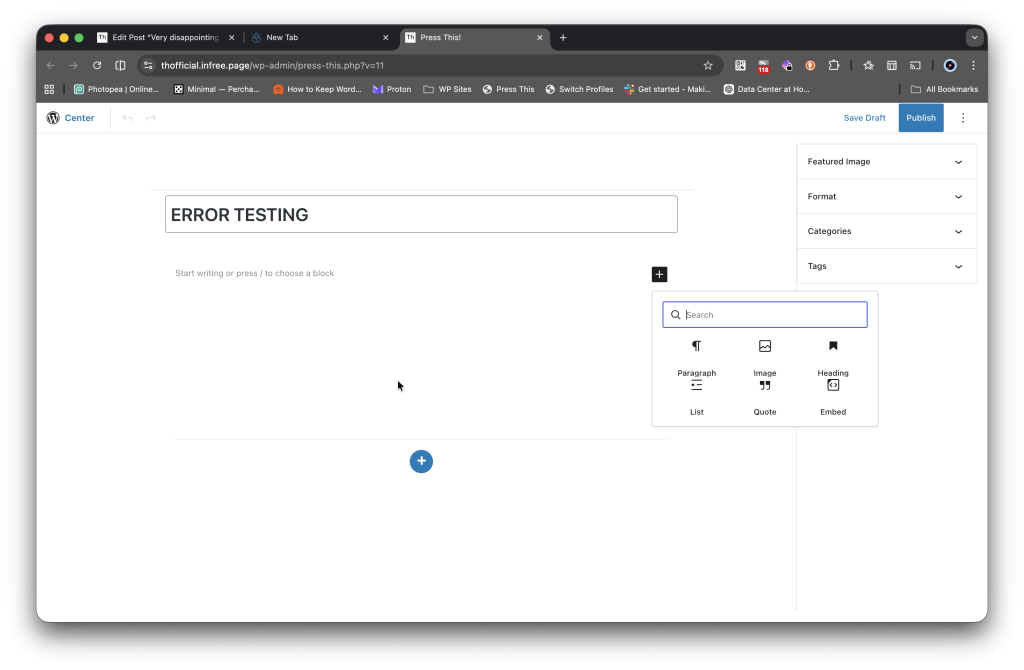
    I was very disappointed like my coffee fell on my essay because of its new Block Editor being broken. I personally like Gutenberg but not this error

    It works at least but the blocks on the second image are very messed up like a WordPress developer was rushing to submit this plugin so they could make WordPress 7? I mean, why would you need to make Press This! 2.0 when you could make it with WordPress 7 included? Also, if WordPress or Matt itself is reading this, please fix this.

    I wished they added the older Classic Editor because the new Gutenberg editor is ugly to be in my opinion and it looks like they vibe coded this new plugin release since if you noticed, the top link is a WordPress.org logo unlike if I go to the standard editor aka Gutenberg/Block Editor

    While I was editing this post, this is my Gutenberg editor

    As you can see, instead of a black WordPress logo, it uses the logo for this site, which is the Th logo (stands for Thirdy in short), hence they really vibe coded (in my opinion) the new Press This! 2.0. So if you have Press This!, it must have your site logo not the WordPress logo (only if you have a site logo!)

    P.S. I love using Pagelayer if you noticed in my rss.xml or pages/posts for animated or hover me headings.

  • WordPress 7 is here

    Sorry if I was late to this topic as i haven’t been posting a lot.

    WordPress 7 Beta 3 just dropped and has new features including AI (which might kill SoftWP) and a new, rounded interface as Modern default

    This is what GPT-4o said:

    WordPress 7.0 Beta 3 Features

    New Features in WordPress 7.0 Beta 3

    WordPress 7.0 Beta 3, released on March 5, 2026, includes numerous exciting new features and improvements designed to enhance user experience and functionality. Here’s a breakdown of the key features:


    Feature Description
    AI Integrations The WP AI Client Connectors screen now dynamically registers AI service providers, enhancing flexibility in using AI tools with WordPress.
    Collaboration Tools Improved workflows support better team collaboration, integrating third-party tools like Slack and Google Docs directly into the dashboard.
    Media Processing Client-side media processing allows users to manage image resizing and compression directly in the browser, reducing server load and enhancing speed.
    Enhanced Editing Experience New blocks have been introduced, such as Tabs, Sliders, and Dialogs, along with improvements to writing flow and drag-and-drop interactions.
    Responsive Editing Controls Implementing responsive controls to tailor block visibility for different screen sizes, integrating much-requested features for mobile responsiveness.
    Admin Redesign A refreshed admin interface with cosmetic improvements for better usability, aiming for a more modern feel without a complete overhaul.
    Block Patterns and Templates Enhanced functionality in managing and editing block patterns and templates, making it easier to create visually appealing content.

    Additional Updates

    • Core and Editor Fixes: More than 148 updates and fixes have been made, including 70 in the Editor and 78 in Core, ensuring a more stable and efficient platform.
    • Enhanced Workflow for Developers: Improved APIs offer developers better capabilities in creating and managing plugins, allowing for complex automations and integrations with minimal coding.

    Outlook

    The final release of WordPress 7.0 is scheduled for April 9, 2026. As with any beta release, it is crucial to test these features on non-production sites to mitigate any issues before the stable version goes live.

    With these advancements, WordPress aims to target better collaboration, efficiency, and responsiveness, positioning itself strongly in the evolving landscape of web content management.

    What I mostly hate about this new WordPress build is the fact it includes AI, which is good and also annoying to most users as it over-automates simple things like categories. It also sometimes gives misinformation.

    Why misinformation, Why?

    Misinformation happens a lot due to the quality of data and most importantly, whatever the user says, it trains AI itself, that is why I don’t always rely on AI and double-check. In fact, this post actually real and doesn’t use AI

    Pages: 1 2 3

  • Why should you go back to RSS/Atom Feeds

    Some people think it’s just another old way to access the web, some people think it’s the best way to access blogs, well, it’s actually the best way to read without ads, most RSS Readers don’t support Javascript or disable it all the times, some lots of people use RSS Feeds still to read, but most of them are tech-savvy or just developers.

    If you need RSS readers, I think the best for Android is ReadYou but for iOS, personally for me it’s NetNewsWire or ReadKit, and also FreshRSS is not as popular as Feedly or Inoreader, which I personally use but I would prefer just regular RSS on local computer or iCloud where RSS OPML files get saved.

    But if you are a company/blogger, you would probably choose RSS from RSS or Atom because it’s more popular but I would “also” highly recommend RSS for readers because it supports more readers than Atom but governments would choose RSS/Atom instead of Social Media because it would be more safe than most social media platforms.

    One thing why also you should go back to RSS/Atom Feeds is because of its non-addictive, no doomscrolling and you get news pretty fast unlike videos which add subscribe/follow and like but with RSS/Atom, you get news instantly, but of course, you can read in websites directly or if the social media platform also has text.

  • The Death of b2evolution

    Disclaimer: All the links on the post you are going to read are not spam and have been checked by the blog author, as we recommend that you should not click on any links as the website can be bought anytime and will get broken.

    This is probably my first style blog post of MJD’s video (especially the title) but I don’t even know why i’m making these MJD-style posts.

    Even the demo site is broken

    Yes, go try it for yourself! It’s might be broken when the post is being built but maybe its active!

    http://demo2.b2evolution.net/stable/ or debian root apache url http://demo2.b2evolution.net/

    I mean just look at the forums, the last topic when this post was released was from 2024! https://forums.b2evolution.net/b2evolution-support-area/b2evolution-support/

    Anyways, you can make a fork on its official github repository, try to find it in github.com/b2evolution

    read here, heres the real content you wanna consume: I mean b2evolution was awesome until WordPress just became the standard, was more popular and became almost anything when b2evolution promised “everything not just blogging” well, nope, if only b2evolution came after b2 was dead, and it didn’t have a bigger name, maybe it was successful? Features in WP are added via plugins and features in b2evolution were pre-installed and b2evolution although also has a Plugins feature, In WordPress, themes were called themes and in b2evolution, themes were called skins just like in Kodi (XBMC) but, themes made more sense in websites , and b2evolution’s userbase was like 0.1% (guess) market share whereas WordPress is 47% and Drupal is 4.7% (from Cloudflare CMS Stats or https://ma.tt/2025/12/cloudflare-cms-stats/).

    WordPress’s and b2evolution spam rate is generally higher in WP and b2evo is fewer, maybe due to plugins or high user base priority.

    So now you know the history and difference in b2evolution and some links that show that proof it has been abandoned, and if the owner of b2evolution is reading, please please select Contact Me at the page

  • Introducing Movies Forum

    The Movies Forum is a simple, yet a movies forum that works and has a good list of movies (and kids cartoons too), but you can also post in Off-topic Movies which are not listed.

    You fans can now go to https://movies.nichesite.org

  • Answer:

    Come up with a crazy business idea.

    No it will fail miserably but will become legendary

  • Pagelayer vs Elementor: which is better?

    When it comes to building a stunning WordPress website, choosing the right page builder can significantly affect your design flexibility and overall user experience. Two popular options that many users consider are Pagelayer (most people think it’s nag ware, not really popular also )and Elementor. This blog post delves into a detailed comparison of these two powerful tools, helping you make an informed decision based on your specific needs and preferences.

    Overview of Pagelayer

    Pagelayer is a relatively newer page builder that integrates seamlessly with WordPress Gutenberg, offering a user-friendly drag-and-drop interface. It allows users to create responsive layouts quickly without requiring any coding knowledge or technical skills. Pagelayer is particularly appealing for those looking for a straightforward solution to design their websites quickly and efficiently. Key Features:

    • Live Editing: Changes can be viewed in real-time as you design.
    • Pre-built Templates: A variety of templates are available to help users get started quickly and easily.
    • Widgets and Elements: Includes essential widgets like images, text blocks, buttons, and more for customization.
    • Responsive Design: Ensures that websites look great on all devices, including mobile.

    Overview of Elementor

    Elementor is one of the most widely used page builders globally, renowned for its extensive features and flexibility. With both a free version and a premium plan, Elementor caters to a broad audience, from beginners to advanced users looking for more advanced capabilities. The plugin is packed with advanced functionalities that allow for intricate designs and customizations. Key Features:

    • Drag-and-Drop Interface: User-friendly interface for easy and intuitive design.
    • Theme Builder: Allows customization of headers, footers, and archive pages for a cohesive look.
    • Extensive Template Library: Thousands of professionally designed templates are available for immediate use.
    • Advanced Widgets: Offers unique widgets like sliders, forms, and social media integrations for enhanced functionality.
    • WooCommerce Support: Excellent for eCommerce sites with dedicated functionality and features.

    Usability and Learning Curve

    Pagelayer:
    Pagelayer is designed with simplicity and ease of use in mind. Its intuitive interface makes it easy for beginners to navigate and create stunning designs without feeling overwhelmed. The learning curve is relatively gentle, making it suitable for users who may not have extensive web design experience or background.

    Elementor:
    While Elementor is also user-friendly, its vast array of features can be daunting for newcomers. However, once you familiarize yourself with the interface, it becomes a powerful tool for creating complex layouts. Elementor offers extensive documentation, tutorials, and community support to help users at various skill levels to succeed.

    Performance and Speed

    Website performance is crucial for user experience and SEO. Both Pagelayer and Elementor are designed to optimize loading times and overall performance, but there are notable differences to consider. Pagelayer:
    Pagelayer is lightweight, which contributes to faster load times and better performance. Its simplicity ensures that users can create websites without compromising speed or efficiency. Elementor:
    Elementor, while feature-rich, can sometimes lead to slower loading times, especially if many widgets and animations are used extensively. However, with proper optimization techniques, such as caching and image compression, users can mitigate these issues effectively.

    Pricing

    Pagelayer:
    Pagelayer offers a free version with essential features, making it an attractive choice for budget-conscious users who want a reliable page builder. The premium version is affordably priced and unlocks additional functionalities for more advanced design options. Elementor:
    Elementor provides a robust free version, but to access advanced features like the theme builder and premium support, users will need to upgrade to one of the paid plans. While Elementor’s pricing is competitive, it may be a more significant investment than Pagelayer for users seeking premium features and options.

    SEO Capabilities

    Both Pagelayer and Elementor provide users with the essential tools necessary to optimize their websites for search engines. They allow for easy integration with popular SEO plugins, such as Yoast and Rank Math. Users can customize important meta tags, headings, and alt attributes for images, ensuring their content is SEO-friendly and optimized for better visibility.

    Conclusion

    Choosing between Pagelayer and Elementor ultimately depends on your specific requirements, budget, and comfort level with web design. If you’re looking for a straightforward, beginner-friendly option, Pagelayer might be the right fit for your needs. However, if you want a more feature-rich experience and the flexibility to create complex designs, Elementor is likely the better choice for more advanced users. Evaluate what you need most in a page builder and consider trying out both options to see which aligns best with your vision for your WordPress site and desired outcomes.

    I used AI on this just to note, thanks for reading!
  • RSS vs Atom feeds – What’s the difference?

    RSS (Really Simple Syndication) and Atom are XML-based formats for web feeds that let users subscribe to content updates (like blog posts, news, podcasts) from websites without visiting them, centralizing information in a feed reader. While both serve the same purpose, Atom is newer, more standardized (an IETF standard), and extensible, whereas RSS has various versions, less strict syntax, and was developed earlier by Netscape. Both use a feed reader/aggregator (like Feedly) to collect and display updates.


    RSS (Really Simple Syndication)

    Origin: Developed by Netscape in the late 1990s, with multiple versions (RSS 0.9x, 1.0, 2.0).

    Structure: XML-based, with simpler, less strict syntax.

    Use: Older, widely adopted format for distributing content updates.


    Atom (Atom Syndication Format)

    Origin: Developed as a more robust, standardized alternative, becoming an IETF standard in 2005.

    Structure: Strict XML syntax, single core format, highly extensible for custom elements and attributes.

    Use: Modern standard for content syndication and the basis for the Atom Publishing Protocol (APP) for creating/editing web resources.


    Key Similarities & Differences

    Function: Both automatically deliver new content to subscribers.

    Technology: Both are XML-based.

    Standardization: Atom is a formal IETF standard; RSS has no single formal standard.

    Flexibility: Atom is more extensible and flexible for custom uses.


    How to Use

    Find a Feed: Look for an orange RSS icon or an “Atom” / “.xml” / “/feed” link on a website.

    Get a Reader: Use a feed reader app (Feedly, Inoreader) or browser extension.

    Subscribe: Add the feed’s URL to your reader.

    Read: See new articles from subscribed sites automatically.

    Thanks for reading, this is my first blog post and I’m still building this site, thx!